 My Account
 Cart
Cart

 Helpline:
  Recite

Dyslexia-friendly typed formats
A guide to making your typed content more accessible to dyslexic readers
Dyslexia is a language-based learning difference that mainly affects someone’s ability to read and spell. Dyslexia also affects working memory and speed of processing.
It used to be considered a visual difficulty, but modern research shows that visual stress and dyslexia are separate, though they do co-occur in many people. A lot of guidance on ‘dyslexia-friendly’ formats is outdated, catering more for visual stress issues or other visual impairments.
This summary outlines key findings from modern research and good practice guidance for typed communications that are helpful for dyslexic readers, visual stress and general accessibility.
Formatting changes do not fix reading problems, but it can make reading easier and less tiring. These suggestions can support dyslexic readers but if used in teaching settings, should complement and not replace evidence-based instruction known to improve reading skills.
This guide has sections on:
- Spacing
- Line length
- Typeface
- Layout and presentation
- Structuring content
- Accessible language
- Style and appearance
- Digital accessibility
Spacing
Research shows that letter, word, and line spacing are more important than typeface for some dyslexic readers. Adjusting spacing can help, depending on the ability of the reader. Younger children and less proficient readers may require more spacing but less so for older, more experienced readers.
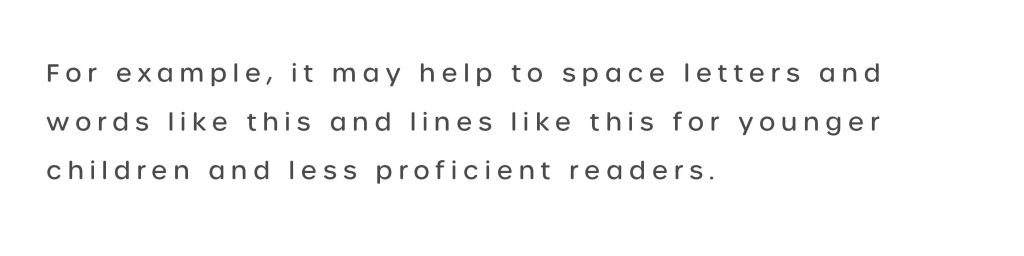
Simple tip if increasing spacing:
- Increase default letter and word spacing by 30% to 35% of the font size (or customised to the reader’s preference)
- Use 1.5x line spacing
Professional design tip – if adjusting spacing:
- Increase tracking by +0.03em to +0.035em
- Increase word spacing in proportion to letter spacing
- Set leading to 1.5x the x-height
- Increase paragraph breaks proportionally (a minimum of 2x the x-height is recommended within WCAG)
Letters
Crowding of letters can be problematic. Increasing spacing to reduce visual crowding – a bit more space between letters and words – can help readability for some readers, as described above. When increasing letter spacing, ensure that word spacing grows in proportion, at least 3x the letter spacing, so that words remain distinct from one another. Avoid excessive gaps: too much letter spacing can slow reading down if words break apart.
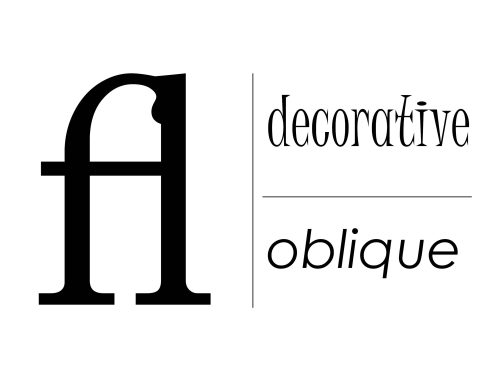
Professional design tip: avoid ligatures, oblique fonts and overly decorative typefaces as these can create visual crowding.
Lines
1.5x line spacing is preferred and is the general recommendation for accessibility within Web Content Accessibility Guidelines (WCAG); this gives breathing room between lines and reduces the chance of misreading adjacent lines. Extremely tight or very wide line spacing can impair comprehension, so aim for 1.5x proportional to font size.
Line length
Line length affects readability.
Good practice for line length in print and on screen is typically 11 to 15 words per line or 50 to 75 characters.
Around 66 characters is often considered generally ideal, but shorter lines can work better for dyslexic readers. Shorter lines reduce the demands on visual tracking and working memory, cutting down on skipped lines.
Typeface
There is no one-size-fits-all ‘dyslexia-friendly’ font.
Typefaces like Dyslexie, Sassoon Primary and OpenDyslexic aren’t necessarily better than standard ones; it’s down to personal preference and suitable spacing.
The ideal letter form and size is different for everyone, and familiar fonts can be more helpful for dyslexic readers as they can reduce cognitive load.
Use a plain, evenly spaced font. Recent evidence shows no consistent advantage of sans serif over serif fonts – spacing is a stronger factor than letter form. However, many readers with dyslexia prefer sans-serif fonts (Arial, Verdana, Calibri, etc.) due to their clarity.
Monospaced fonts (like Courier) can also be effective. Evidence does not show a consistent reading advantage for specialised ‘dyslexia fonts’. You should use them only if an individual finds them helpful.
Font size for print and web should be at least 12pt, with many readers benefitting from a larger size. Research shows dyslexic readers often read faster and with better understanding at larger text sizes, so whenever possible allow users to choose a comfortable larger font.
Key point: It’s letter, word and line spacing combined, not style, that makes text easier to read for people with dyslexia. However, familiar fonts will be more helpful. It’s personal preference, so each person should find what works for them.
Tip: If creating a document or article for a dyslexic reader, offer varying or alternative formats to suit their individual needs. Where possible, provide typed information in someone’s preferred font or in a format that allows them to change the font.
Layout and presentation
Align text to the left (avoid full justification). This maintains consistent spacing between letters and words.
Chunking: structure your content into visually distinct groups or sections. For example, use clear headings and subheadings
Keep layouts clean and uncluttered
Make headings bolder and larger than body text (headings should be no smaller than body copy, and should be scaled at around 1.5x greater for each level and bolded for visual distinction.) This helps readers quickly scan and find relevant sections, reducing reading fatigue.
Structuring content
Write in up to 25 words for each sentence, maximum 5 lines per paragraph. Start with the most important information and follow with less critical details.
This ‘inverted pyramid’ approach reduces cognitive load by reducing the need to search the text.
Top: Start with the key point or summary — the ‘need to know’ information.
Middle: Add supporting details, background, and explanations.
Bottom: Finish with extra or less critical details that are ‘nice to know’.
Style and appearance
Colour Contrast
People with visual stress (which commonly co-occurs with but is different from dyslexia) tend to prefer low contrast text-to-background colours, for example navy blue on a pale yellow or cream background rather than black-on-white.
Like this
High contrast black-on-white can trigger glare or visual stress in some readers with dyslexia. Studies show that off-white or tinted backgrounds (for example cream, peach) with dark text improve reading speed compared to stark white backgrounds. Matte, non-glossy paper further helps by reducing glare and reflection. These adjustments don’t universally aid every dyslexic reader (some have no visual sensitivity), so individuals may have their own preferred text-to-background colour or contrast level.
Professional design guidance: Web Content Accessibility Guidelines (WCAG) recommend a minimum contrast ratio of 4.5:1 between text and background for digital accessibility, so this is the lowest contrast level to be compliant with the regulations. WebAIM has a free contrast checker for digital design.
Digital accessibility
- Use logical headings to structure content and make it easier to navigate visually and aurally (such as with speech-to-text).
- Apply bookmarks to long documents.
- Ensure compatibility with screen readers. (Being able to listen to content helps reduce cognitive load of reading.)
- Where possible, add relevant illustrated content – diagrams, photographs and/or video instructions to complement text-based information.
- Text on presentation slides should be used sparingly. 32pt is a suggested minimum for good readability (consider how it might be viewed on different screen sizes from different distances).
More tips for more accessible typed formats
- Offer multiple format options (for example, different typefaces, font sizes, spacing and background colours) or provide a format that allows a reader to customise the text.
- On websites, use an accessibility toolbar to let users adjust settings to suit their own preferences
- Enable features like text-to-speech
- Avoid PDFs unless they are intended for print – they’re not adaptive to screen sizes, are tricky to navigate and are hard for screen readers to follow.
- Tip: Where possible, provide video-based alternatives to typed formats.
Free resource
Download the printable guide